In Linux, there is a privilege for users like sudo privilege. In case of using the sudo command on the terminal, you will be asked for a password. When you type a password, you will not see any visual feedback like an asterisk or anything.
For example:
Here, we are trying to run the command “sudo apt update” then it asks for a password. After entering the password, there is no visual feedback and it shows blank on the password section.
$ sudo apt update

But if you want some visual feedback like an asterisk on the password field, it can be sorted out with small changes on the /etc/sudoers file. You can backup this file first before changing it with the following command:
$ sudo cp /etc/sudoers /etc/sudoers.bak

To show asterisk while typing sudo password on Linux
Now, to edit the /etc/sudoers file, you can simply run the following command.
$ sudo visudo
You must have to search the following line and do some changes on that section.
Defaults env_reset
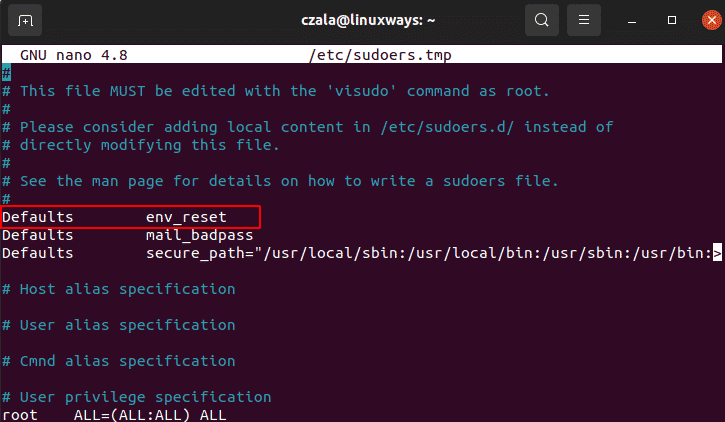
Now append pwfeedback on this line for showing the asterisk on the password section.
Defaults env_reset, pwfeedback
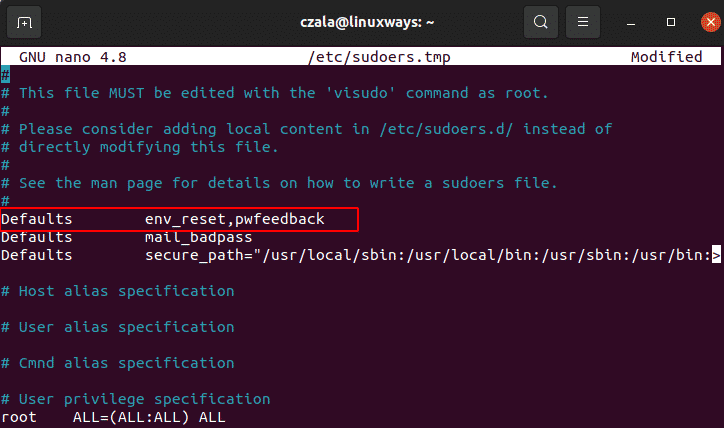
Press ctrl + x to save the changes and then y to exit.
Now you can try to run the previous command and check if you can see any visual feedback on the password section after using sudo.
$ sudo apt update
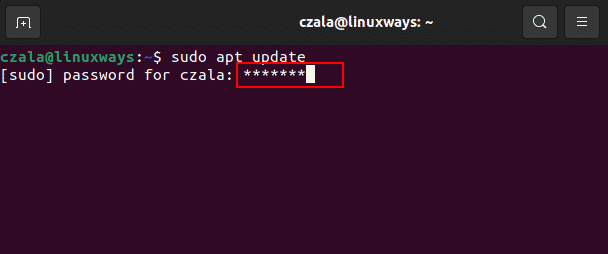
Finally, you can see the asterisk as a visual on the password after some changes on the /etc/sudoers file.
Conclusion:
Now, you get the idea to show an asterisk as visual feedback while typing sudo password. Try once on Ubuntu or Centos by doing small changes on the file on /etc/sudoers file. Thank you!

Karim Buzdar holds a degree in telecommunication engineering and holds several sysadmin certifications including CCNA RS, SCP, and ACE. As an IT engineer and technical author, he writes for various websites.