Introduction
free command is used to check the total amount of free space available with used memory and swap memory in your system.
This command is very necessary for Linux administrators when you want to install a large program. It saves time to check the capacity thereby making the installation process more smooth. We will show you how to use the free command through several examples as you go through below.
The syntax of free command
$ free [options]

total: total installed memory
used: total used memory
free: free available memory
shared: memory used by tmpfs
buff: memory used by the OS kernel
cache: memory used to store temporary data
available: total available memory
options:
-b output with unit bytes
$ free -b
Output:

-k output with unit kilobytes
$ free -k
Output: 
-m output with unit megabytes
$ free -m
Output:

-g output with unit gigabytes
$ free -g
Output:

-t more statistics on total memory capacity including swap space
$ free -t
Output:

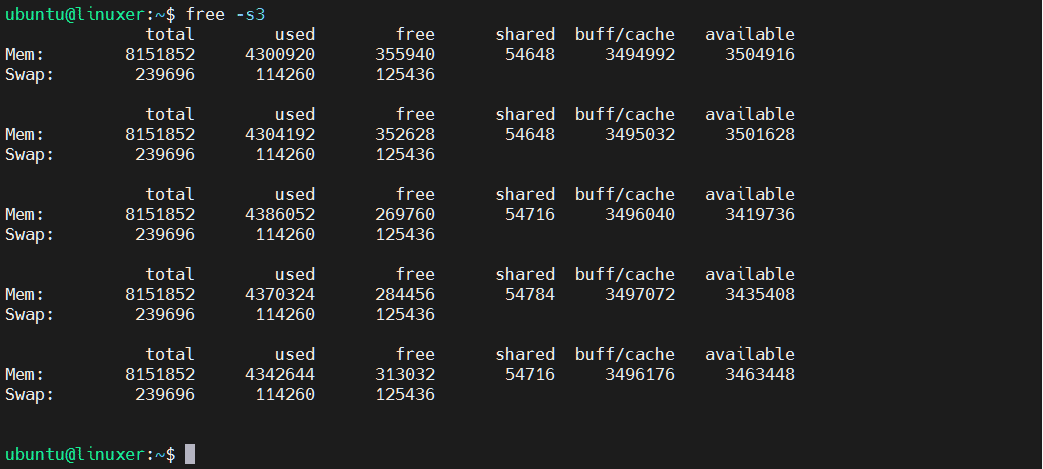
-s statistics with delay time appearing
For example, I want to make statistics every 3 seconds:
$ free -s3
Output:
Conclusion
In this tutorial, we guided you on how to use the free command with some examples.
Thanks for reading!

Karim Buzdar holds a degree in telecommunication engineering and holds several sysadmin certifications including CCNA RS, SCP, and ACE. As an IT engineer and technical author, he writes for various websites.