Introduction
HexChat is an IRC-based communication and coordination software. It has several advantages over terminal-based IRC utilities. It helps users to navigate easily from one chat server to another. In this guide, We are going to learn how to install HexChat on Debian. I am using Debian 10 Buster Edition. All instructions and commands only apply to Debian. Do not try to install HexChat from PPAs as it will result in a system break.
Installing HexChat
Run the following command to install HexChat on Debian:
$ sudo apt install hexchat

HexChat will be installed from Debian stable repositories.
Launching HexChat
You can access HexChat from CLI or from the dashboard.
$ hexchat
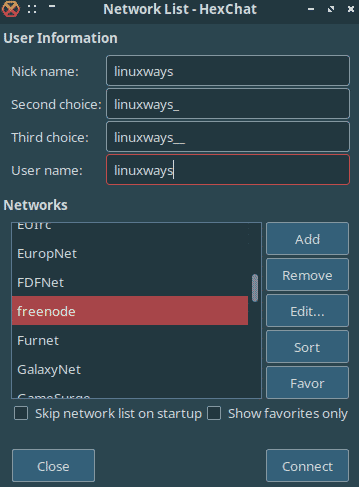
As soon as it is run, it shows a network list to join.
Uninstalling HexChat
Simply run the following command and HexChat will be gone from your Debian system.
$ sudo apt remove hexchat

You are good to proceed now.
Conclusion
In this guide, we learned how to install and remove HexChat which is a nice chatting utility to connect with IRC servers. This guide is solely based on Debian 10 buster edition.

Karim Buzdar holds a degree in telecommunication engineering and holds several sysadmin certifications including CCNA RS, SCP, and ACE. As an IT engineer and technical author, he writes for various websites.