“If you want to have a rough idea about the sizes of the files that you have on your Linux system, it is always good to sort them in some order so that you can get an overview of the space occupied by each file. The LS command in Linux can also be used for this purpose, and in this article, we will be talking about the methods of sorting the files by size with the LS command in Linux Mint 21.”
Methods of Sorting the Files by Size With the Linux LS Command
To sort the files in the descending order of their sizes with the Linux LS command, you can use any of the following three methods:
Method # 1: Using the “-lS” Flag
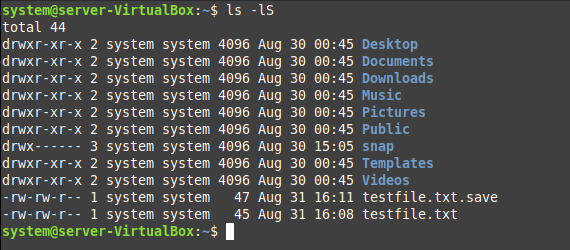
The simplest way of sorting the files by their sizes in Linux is by running the command shown below:
$ ls –lS

The “-lS” flag sorts the output of the LS command in the descending order of the file size, as shown in the following image:
Method # 2: Using the “-lSh” Flag
In the method used above, the sorted file sizes were not in a human-readable format. Therefore, to display the output in a human-readable format, you have to use the LS command as shown below:
$ ls –lSh

All the files sorted in descending order with their human-readable sizes are shown in the following image:

Method # 3: Using the “-lSha” Flag
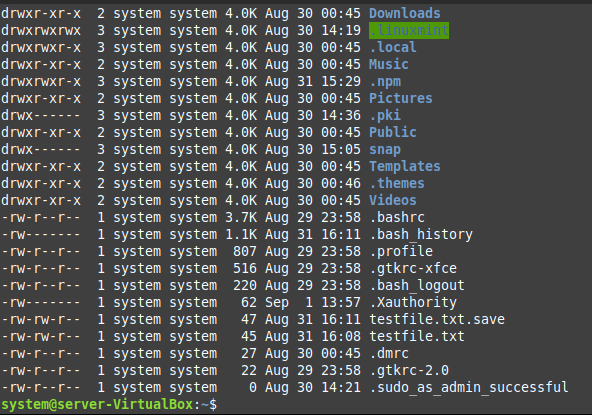
In both of the methods discussed above, the hidden files were not displayed in the output. Therefore, if you also want the hidden files to be displayed and sorted in the descending order of their sizes, then you will have to use the command shown below:
$ ls –lSha

Using this variant of the LS command, you will be able to sort all of your files in the descending order of their sizes, including the hidden files as shown in the following image:
Conclusion
This article explained three different methods of sorting the files in descending order of their sizes while making use of the LS command in Linux. You can follow any of these methods depending upon the nature of output that you expect.

Ayesha Sajid has secured a Bachelors degree in Computer Sciences and currently, she is doing her Masters in Information Security. She is a technical content writer by profession who has experience in working with Windows and the different flavours of Linux operating system.