Introduction
ldd is the useful command to see executable files and shared object dependencies. Files that start with /lib are called libraries. A library helps a program to use common processes without any handling or administration overhead.
There are two types of libraries: static and dynamic libraries.
Below is the guide on how to use the ldd command in Linux as we go through below.
Install the ldd command
If your ubuntu version is too old, let’s run apt command to install:
$ sudo apt install libc-bin
Output:

The syntax of ldd command
$ ldd [option]... file...
[option]
-v show all information
-u show unused direct dependencies
-d data relocation
-r data and function relocation
Show detailed information
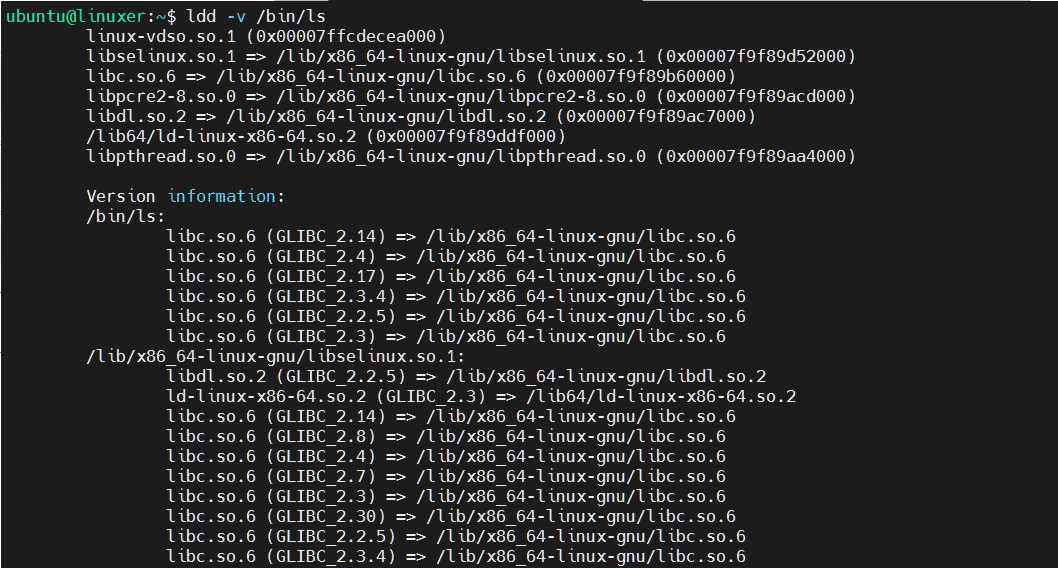
You can use the ldd command with option -v to show detailed information. For example, we will display detailed the dependencies of the ls command:
$ ldd -v /bin/ls
Output:
Show unused direct dependencies
You can use the ldd command with option -u to show unused direct dependencies. For example:
$ ldd -u /bin/grep
Output:

Conclusion
You have gone through the details of how to use the ldd command in Linux.
Thanks for reading.

Karim Buzdar holds a degree in telecommunication engineering and holds several sysadmin certifications including CCNA RS, SCP, and ACE. As an IT engineer and technical author, he writes for various websites.